Layout-aware PDF diff
Know exactly what changed between two PDFs.
kogo (校合) is the Japanese publishing term for checking a revision against the original.
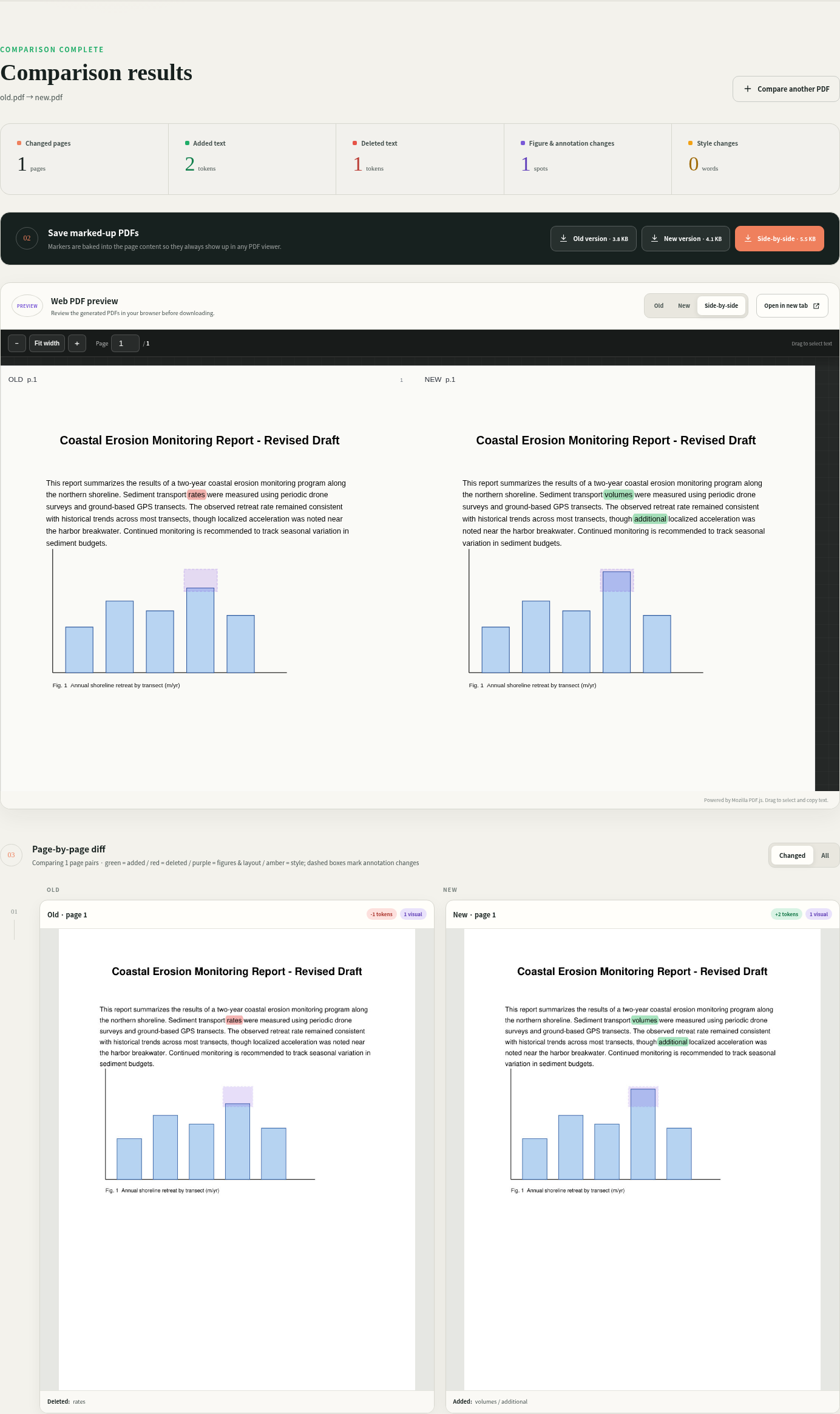
kogo compares an old and new PDF and highlights added or deleted text, figures, and annotations — in the browser and in marked-up PDFs you can hand off to anyone.
Features
Built for real documents, not toy diffs
Manuscripts, slide decks, and scanned exports all need different handling — kogo reconstructs reading order and page correspondence before it ever diffs a word.
Layout-aware reading order
Reading order is reconstructed from whitespace layout, so multi-column pages and slide-style text boxes are compared correctly instead of interleaved.
CJK character precision
Word-level diff for Latin text, character-level precision for CJK (Chinese, Japanese, Korean) text — including rare kanji across CJK Extensions B–J.
Page alignment
Pages are aligned with a similarity-based sequence alignment using both text and visual signatures, tolerating inserted or removed pages.
Figure & layout visual diff
Figures, equations, and layout are compared visually with text areas masked out, plus scanner/export shift registration for image-only pages.
Annotation diff
Detects added or removed highlights, comments, and ink annotations by fingerprinting existing PDF annotations and diffing them separately.
Style-change detection
Bold, italic, and font-size changes on otherwise-unchanged text are detected and marked in amber, separately from content changes.
Baked-in markers
Markers are baked into the output PDF pages, so they show up in any viewer — even one with annotations hidden or unsupported.
Selectable-text web preview
A built-in web preview powered by Mozilla PDF.js, with downloadable old-highlighted, new-highlighted, and side-by-side comparison PDFs.
Local processing, no upload
All processing happens locally — nothing is sent to an external service. No accounts, no cloud storage, no telemetry.
Quick start
Pick CLI, web app, or Docker
The base package is CLI- and library-only, with no web dependencies. Add the serve extra or use Docker if you want the browser UI.
CLI only
Installs the diff engine and command-line tool. No web dependencies required.
pip install kogo
kogo diff old.pdf new.pdf -o out/Web app
kogo fetch-viewer downloads the local PDF.js viewer assets used by the web preview; it's not needed with Docker, which bundles them in the image.
pip install "kogo[serve]"
kogo fetch-viewer
kogo serveThen open http://127.0.0.1:8080.
Docker
By default the container only binds to 127.0.0.1. There is no authentication built in, so only bind to 0.0.0.0 on a trusted network.
docker compose up -d --buildThen open http://localhost:8080.
Use as a library
The diff engine is a regular Python API — pip install kogo is enough, no web dependencies needed.
import kogo

result = kogo.compare_pdfs("old.pdf", "new.pdf", "out/")
print(result["summary"])
# out/ now contains old-highlighted.pdf, new-highlighted.pdf,
# side-by-side.pdf, result.json, and page previews.kogo.compare_pdfs raises kogo.ComparisonError for user-facing problems (encrypted, empty, oversized, or unreadable PDFs). Keyword options mirror the CLI: dpi, sensitivity, max_pages, previews, old_name, new_name.
Result structure
| result key | content |
|---|---|
files | file names and page counts of both inputs |
summary | totals: changed / added / deleted pages, added / deleted tokens, visual regions, style changes, annotation changes |
rows | per aligned page pair: kind (unchanged / changed / added_page / deleted_page), page numbers, change counts, text snippets |
artifacts | output file names and sizes (old-highlighted, new-highlighted, side-by-side) |
legend, settings | color legend and comparison settings used |
The full JSON is also written to out/result.json. Run help(kogo.compare_pdfs) for the complete reference.
pip install kogo gives you the CLI and library only. The browser UI needs the
serve extra (pip install "kogo[serve]") or the Docker image, both of
which add FastAPI/Uvicorn and the PDF.js viewer assets.
License
AGPL-3.0
kogo is licensed under AGPL-3.0. See LICENSE.
PyMuPDF (and the underlying MuPDF library) is distributed under AGPL-3.0-or-commercial; check its license terms before redistributing kogo or offering it as a network service.
Credits:
- Mozilla PDF.js (Apache-2.0)
- PyMuPDF (AGPL-3.0-or-commercial)
- OpenCV (Apache-2.0)
- FastAPI (MIT)